
UK & US guide
Fresha travel-time guide
How to add travel time between appointments in Fresha
A colour appointment may include processing time, but the drive to the next client is time when you can't see anyone. Fresha treats those two kinds of time differently, and picking the right one matters. This guide gives the steps from Fresha's own help pages, checked on 5 October 2026, with a worked example for a mobile hairdresser.
Quick answer
Yes, with blocked extra time. Open the service in Catalog, choose Add extra time under Pricing and duration, pick Blocked, and set the minutes before or after the service. You can also change it on a single appointment. Blocked time is a fixed number of minutes that you set. We couldn't find a Fresha help page that describes working out the drive from the client's address.
The short answer: can Fresha add travel time?
Fresha has no setting called travel time. It has extra time, in three types. Fresha's guide describes blocked time as time when the client is not present and the team member is unavailable for new bookings. That is the one to use for a drive. It says blocked time isn't visible to clients, though you see it on your calendar.
Processing time is different. Fresha describes it as time when the client is still present while the team member is available to take another appointment, such as when a colour develops. It shows on the calendar as a partially open slot. Use it for a drive and someone could book you while you are in the car.
Fresha does cater for mobile work at setup: one choice when you create a workspace is that you visit your clients as a mobile operator. Beyond that, we couldn't find a Fresha help page about a service area or about working out travel between two clients' homes. So yes, you can add travel time, and you choose how much.
Step by step: add blocked time in Fresha
Set a rule on each service first. Then adjust single appointments when a journey is unusual.
Fresha's guide says extra time set on a service applies to new appointments booked for that service. Appointments already in your calendar keep what they had, so go through them after you change a rule.
- On desktop, go to Catalog, then Service menu, and click the service.
- Under Pricing and duration, click Add extra time and choose Blocked.
- Use the dropdown to set the duration. Fresha greys out the service time so you can place the extra time before or after it.
- Click Save. Repeat for each service you do at clients' homes.
- On the mobile app, tap More, open Catalog, then Service menu. Tap the service, choose Edit, and find Pricing and duration under Basic details.
- For one appointment, open it from the Calendar, select the service, click Add extra time, choose Blocked, set the minutes, then Apply and Save.
- Book a test appointment from your online profile and check the first time offered after it.
What fixed blocked time can't know
Here is an example with made-up distances and drive times. A mobile hairdresser does a 60-minute cut and blow-dry and adds 25 minutes of blocked time after it. Three different clients book the next slot.
The block suits the middle journey and misses the other two. A run of short hops like the first row leaves 20 minutes unused after each visit. One journey like the third row makes you 15 minutes late, and the client after that waits too.
You can edit the extra time on a single appointment to fix a known long drive. That works when you spot it. It relies on you reading every address and remembering to do it.
| Next client | Distance | Drive time | With 25 minutes blocked |
|---|---|---|---|
| Same neighbourhood | 1 mile | 5 minutes | 20 minutes unused |
| Across town | 7 miles | 22 minutes | 3 minutes spare, before packing up |
| A village outside town | 13 miles | 40 minutes | 15 minutes late |
When fixed blocked time is enough
For many mobile hairdressers, blocked time does the job, and Fresha's other tools are worth keeping. Stay as you are if most of these are true.
Keep colour processing honest while you are at it. At a client's home, a 30-minute processing gap doesn't make room for a second home visit. You would need the drive there, the work, and the drive back. If you stay with the client, treat the whole visit as one block.
- Your clients live close together, so most drives are a similar length.
- You see three or four clients a day, and a spare quarter of an hour doesn't cost you a booking.
- You keep home visits to set days and areas.
- You rely on Fresha for a salon chair, a team, repeat appointments or new clients from its marketplace.
- You read each new booking's address and don't mind changing the extra time on the odd one.
When to use address-aware booking instead
Blocked time stops being enough when your clients are spread out, when your days are full, or when you are editing extra time on most appointments. Then the client's address needs to shape the times she is offered.
CalMov works that way. The client enters her address first, and CalMov only offers times you can reach, allowing for the journey before and after each visit. On Pro, drive times come from the roads, with expected traffic. You can set a service area by distance or drive time.
Be clear about the plans. On the free Lite plan, CalMov uses a fixed travel gap that you set, the same idea as Fresha's blocked time. Road-based drive times are on Pro, at £22 a month at the founder price and £29 as standard ($29 and $39 in the US), with a 14-day free trial and no card.
CalMov is not a salon system. It has no marketplace, and Lite and Pro are for one person. It does have tools that suit colour work at home, such as a check that a client has an in-date allergy alert test before she can book a colour.
When an appointment moves or runs over
A client asks to come an hour later. A colour takes longer than planned. Each change gives the visit new neighbours, and so new drives.
In Fresha, the blocked time stays attached to the service, but it is still the same fixed number. After you move an appointment, look at the address before it and the address after it. If the drive is longer than the block, edit the extra time on that appointment, and keep a short note of why.
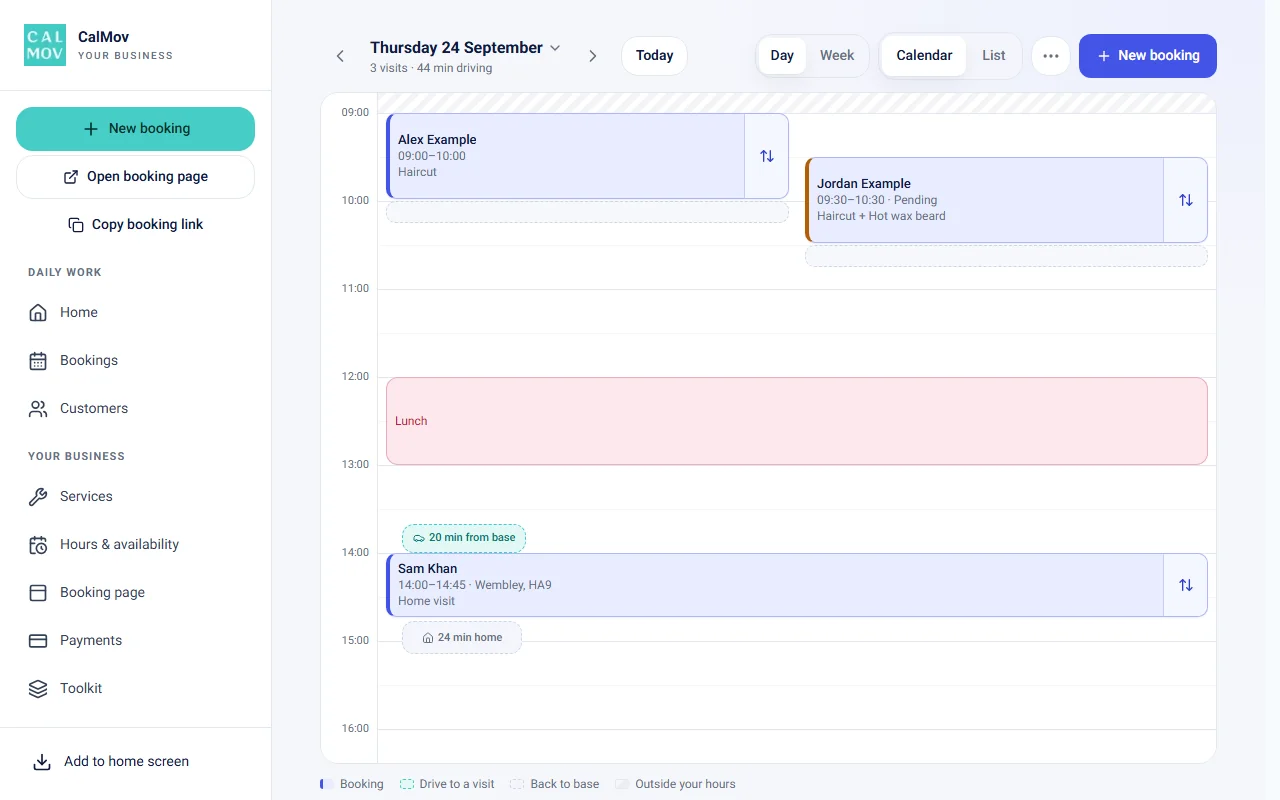
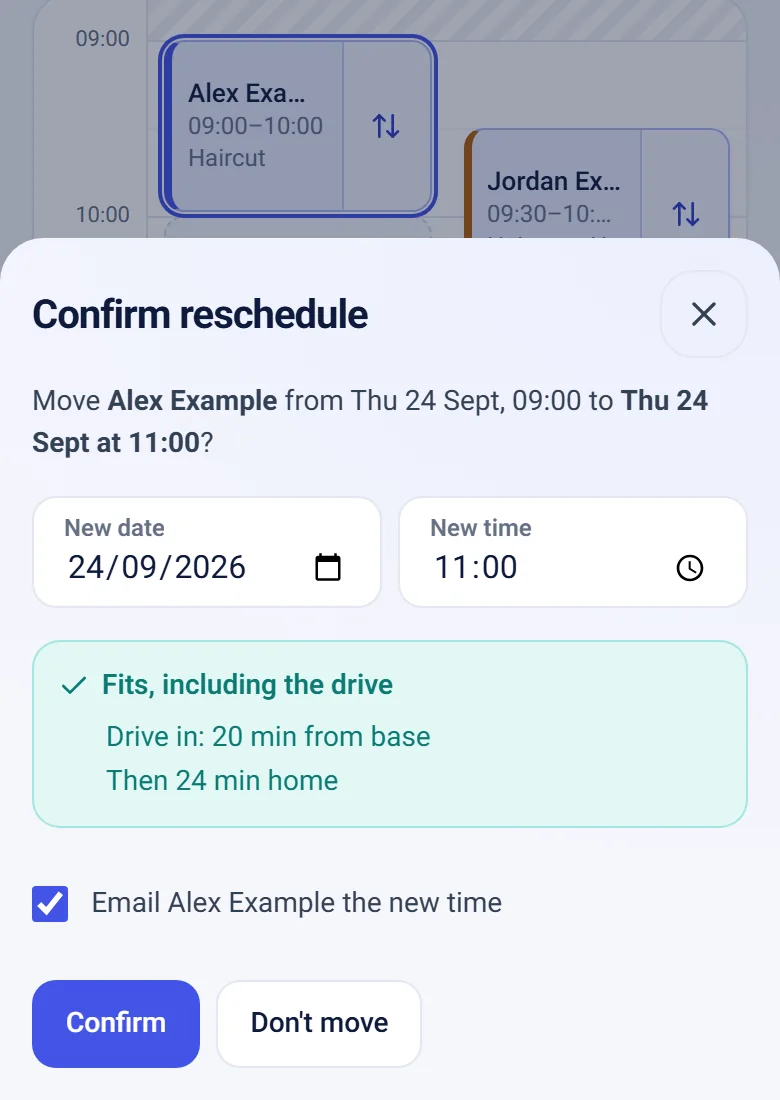
In CalMov, you drag the booking to a new time on the calendar, and it checks that the new time fits, including the drive. The calendar shows the drive time between visits and the drive back to base.
Checklist to set it up either way
The groundwork is the same in any tool: know your real journeys, keep travel closed to bookings, and test as a client.
- Record a week of real gaps: packing up, driving, parking and carrying your kit in.
- In Fresha: add Blocked extra time to each home-visit service. Never use Processing for a drive.
- In Fresha: set a longer block on services with more kit, such as colour.
- In Fresha: after changing a service, check the appointments you already have.
- In Fresha: block time on your calendar for the first drive out and the drive home.
- In CalMov: set your service area, minimum notice and booking window. On Lite, set your travel gap. On Pro, drive times are worked out for you.
- In either: book a test visit from a near address and a far one, on a phone, with your longest service.
- In either: look again in a month. Count late arrivals and wasted gaps, then adjust.
Frequently asked questions
Should I use blocked time or processing time for travel?
Blocked time. Fresha's guide says blocked time makes the team member unavailable for new bookings. Processing time leaves the team member available to take another appointment, so a client could book you while you are driving.
Can clients see the blocked time I add?
Fresha's guide says blocked time isn't visible to clients. Your team sees it on the calendar and within the appointment. The client sees the service and its length.
Does new extra time apply to appointments I already have?
Fresha's guide says extra time added to a service applies to new appointments booked for that service. For bookings already in your calendar, open each one and add the extra time to the appointment itself.
Should I use one allowance for every service?
Only if the full gap between visits is about the same. A dry cut needs little packing up. A colour uses more kit and takes longer to clear. Set extra time per service, and count each task once.
Does blocking time also add a travel charge?
No. Holding minutes and charging money are separate decisions. We didn't find a travel fee setting in the Fresha guides we read, so if you charge for travel, check how your service prices show it to the client.
Can Fresha stop clients outside my area from booking?
We couldn't find a Fresha help page that describes a service area by distance or drive time. State your area clearly in your profile and service descriptions, and check each new address when it comes in.
Sources and further reading
Sources used to check this guide. Check the linked guidance for current requirements, features and prices.
How CalMov helps
CalMov combines service duration, working availability and customer location to help mobile businesses offer bookable times that allow for the surrounding journeys.
Explore CalMov for mobile hairdressers