
Mobile hairdresser scheduling
Mobile hairdresser booking software with travel time between clients
CalMov is mobile hairdresser booking software that fits cuts, colour appointments and blow-dries around the journey to each client. It uses your service durations, customer addresses and existing appointments to decide which times to offer, and can add your travel charge to the booking. It works in your phone's browser: nothing to download, and you can add it to your home screen.
Common scheduling problems
Services vary in length
Cutting, styling and colour work occupy very different parts of the day.
Setup and travel compete for time
Packing equipment and reaching the next home cannot happen inside the same calendar gap.
Late bookings affect the whole route
One unrealistic journey can delay every customer who follows.
How CalMov helps
Service-specific durations
Create clear services with the time and price customers need to understand.
A travel gap you choose on Lite
Lite adds the gap you set between home visits, so every booking leaves room to pack up and drive.
Road-based checks on Pro
Pro considers available roads and expected traffic for the planned appointment time.
Google Calendar and UK payments
Connect Google Calendar to see confirmed bookings in your calendar. UK businesses can take Stripe payments on Pro, or on Lite with the Online payments upgrade.
Automatic travel pricing
Keep the cut, colour or styling price separate from travel. Set distance or journey-time brackets and CalMov applies the matching charge for the one-way trip from your business base to the customer.
The toolkit
Built for mobile hairdressers: your toolkit
Tools for colour work in clients' homes: the allergy alert test, the right length of appointment and a record of what you used. Nothing is switched on until you choose it, and you can switch a tool off again without losing anything.
Allergy tests
An allergy alert test 48 hours before any colour
Set your colour services to need an allergy alert test at least 48 hours before, with a pass that lasts as long as you choose, such as 180 days. A client without an in-date pass sees "Needs first: Allergy alert test, at least 2 days before" and is offered "Book Patch test first". When the test visit is finished, CalMov asks you to record Passed or Failed.
Your booking page
Home, after the test
Did Sam's allergy alert test pass?
Until it's passed, Root colour can't be booked. You record the result.
Time & price questions
Hair length sets the time and price
Ask hair length on the booking page and let each answer add time and price ("Long: +30 min" and more on the price), so a long-hair colour isn't booked into a short slot. A colour can be set out in stages: apply 20 min, develop 30 min, rinse and finish 25 min. On Pro, a colour correction can be set to "We'll review it": the client sends a request, the time is held, and you confirm or adjust it first.
Your booking page
Try hair length and have you coloured your hair at home? yourself. Long and yes: on Pro and Team that one waits for you to approve it.
Hair profiles
Hair profiles that remember each client
Hair length, hair type and anything else marked "Ask once and remember it" are saved to the client's profile, so she picks it next time instead of typing it again. Highlighted answers, such as allergies or sensitive skin, show on each booking as "Important for this appointment".
Your booking page
Which client is this for?
Pick one and the details fill in.
On the booking
Sam
Hair type: Wavy
Allergies or sensitive skin: Sensitive scalp. Important for this appointment
Also there when you need it
Colour & cut record
A colour and cut record for every visit
Start job times the appointment against its estimate and keeps your notes, such as the colour formula you mixed. The checklist (consultation, colour or treatment, cut, finish) is Pro.
Forms after booking
Questions that can wait, asked after booking
Allergies, sensitive skin and anything else you need before the visit go in a short form linked in the confirmation email, due a day before. Returning clients see what they said last time and tap "Nothing's changed".
Photos
Before and after photos of the colour (Pro)
Take up to 12 photos a visit, kept for 2 years, and email the client a report with the ones you choose. Photos and the report are Pro.
Rebooking reminders
Root reminders every 6 weeks
About a week before a client is due, CalMov emails her a link to book the same service around her due date. Set the weeks for each service: 6 for roots, longer for a cut if you like.
Only switch on what you need
Every tool starts switched off. Switch one on in Toolkit when you want it, and switch it off again without losing anything you've saved. Your booking page only changes when you change it.
Client profiles
Remember the details behind the next appointment
Configure reusable questions for hair length, hair type and the client's usual service. Use a separate question for requests that change each visit. These example fields are yours to choose; hair length can also be a time and price question, so a longer answer books a longer appointment.
Saved answers are reused when the customer books the same profile again.
Questions marked every booking start fresh for the next appointment.
Example hair client
Sam
- Hair length
- Shoulder length
- Hair type
- Wavy
- Usual service
- Cut and blow-dry
Ask every booking
What would you like this time?
Trim the ends and keep the current shape
See what your customer books
Customers enter their address, choose a service and pick an available time. Before they confirm, they can review the service price and any travel charge together.
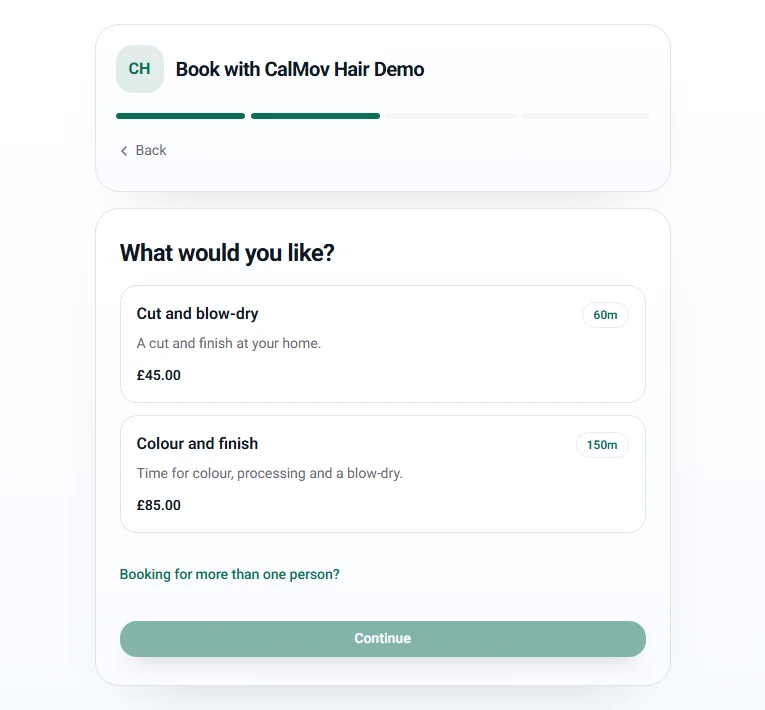
Give each service the time it needs
A cut and blow-dry can have a shorter appointment than a colour and finish. Set the full time you need for each service.
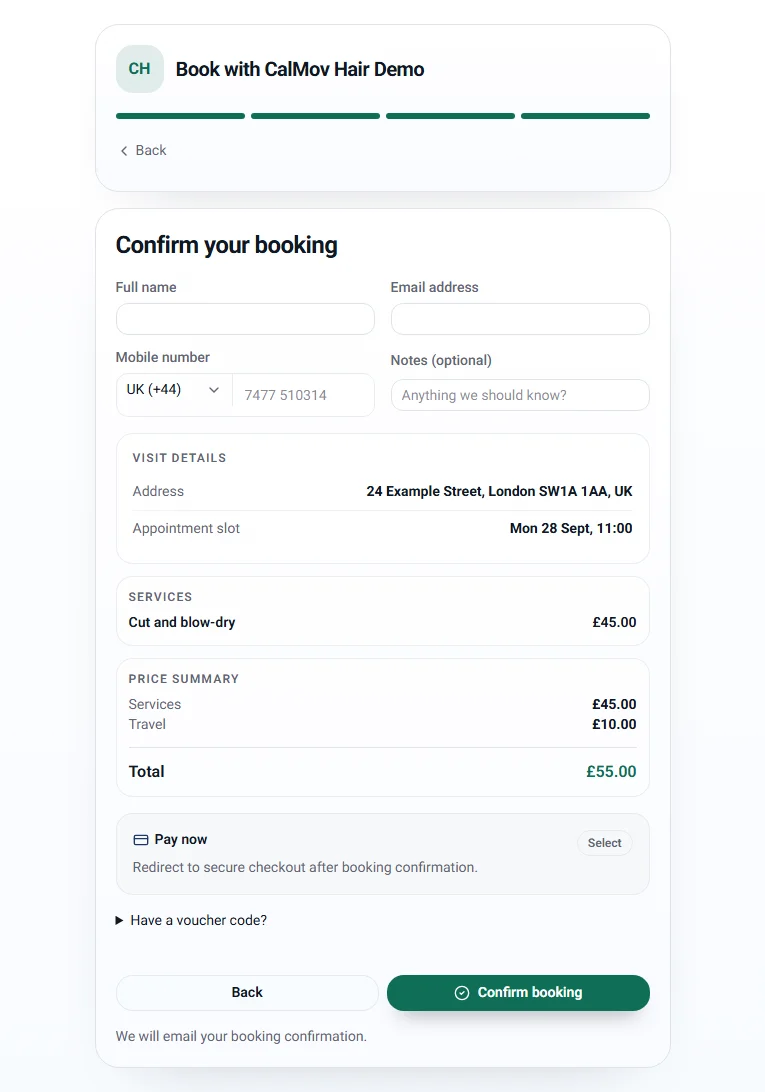
Show the total before confirmation
With travel pricing enabled on Pro, customers see the journey charge separately from the service price.
UK demo screenshots of the CalMov booking form. Services, prices, address and availability are examples. Your own settings determine what customers see.
Watch the booking walkthroughAn example day
A new colour client, from patch test to roots
- 1. Monday: Priya, a new client, enters her address and chooses Root colour. The page says it needs an allergy alert test at least 2 days before, and offers Book Patch test first.
- 2. She books the test for Tuesday, choosing from times you can reach between that day's other clients.
- 3. Tuesday: you do the patch test between two cuts nearby. When it's finished, CalMov asks for the result, you record Passed, and Priya is emailed that she can now book.
- 4. She books her colour for Friday and answers Hair length: Long. The page shows the longer time and the price before she confirms.
- 5. Friday, 1:00pm: the colour runs in its stages (apply 20 min, develop 30 min, rinse and finish 25 min), and you note the formula in her colour and cut record.
- 6. Your 3:30pm cut was only offered that time because the colour and the drive to the next address both fit before it.
- 7. About five weeks later, CalMov emails Priya a link to book her roots again.
How booking works
Plan a mixed day of cuts and colour
A longer service needs a longer appointment, even when part of it is processing time. Set aside the full visit before adding the drive to your next client.
- 1.
Reserve the complete visit
Create separate services for cuts, blow-dries and colour work. Include processing, setup and clearing away in each duration. CalMov reserves one continuous appointment; it does not open processing time for another client.
- 2.
Leave room to work in a client's home
Allow for carrying equipment, setting up and tidying the space. Make any access or workspace requirements clear before the visit.
- 3.
Check the journey around each service
Customers enter their address before choosing a time. Lite allows for travel with a fixed gap you set; Pro checks roads and expected traffic on the journeys around existing appointments.
- 4.
Keep repeat booking simple
Returning clients can choose their saved profile and answer your question for this visit. They select the service to book, and see any travel charge before confirmation.
Before you choose
Is CalMov right for you?
CalMov suits a solo mobile hairdresser offering cuts, styling and colour appointments at customer addresses. Include setup, processing time and clearing away in each service duration, then leave room for travel.
A good fit when
- You work alone and travel to one customer address at a time.
- You can give each bookable service a realistic duration and price.
- You want travel charges based on distance or journey time alongside your hair service prices.
- Your main problem is fitting location, service time and travel into one diary.
You may need another system if
- You need clients to send documents other than a photo, or stock control and salon chair allocation.
- You need several stylists to take simultaneous bookings from one account today.
Free planning tools
Free planning calculators for mobile hairdresser scheduling
Use your own prices, travel time and costs to see what a working day could earn.
Mobile Hairdresser Pricing Calculator
UK & US calculator · GBP or USD
Include colour processing, products, travel and overheads when pricing a cut or colour appointment.
Use this free calculatorMobile Travel Fee and Service Area Calculator
UK & US calculator · GBP or USD
Test whether one customer journey meets your target and estimate a transparent travel fee when it does not.
Use this free calculatorFrequently asked questions
Can I offer several hair services?
Yes. Lite includes up to two services, or unlimited services with a monthly upgrade; Pro includes unlimited services. Each service has its own duration and price.
Can I book another client while colour is processing?
No. CalMov reserves one continuous appointment for the selected service. Include processing time, setup and clear-down in the duration.
Can customers pay online?
UK businesses can take Stripe payments on Pro, or on Lite with the Online payments upgrade. You can also let customers book now and pay later. Payment options differ by country, so check the pricing page for your region.
Can I charge for travel separately from the hair service?
Yes. Travel pricing is included on Pro. The customer sees the service price and any travel fee before confirming.
Is there a CalMov app for mobile hairdressers?
CalMov works in your phone's browser, so there is nothing to download from an app store. Add your CalMov dashboard to your home screen and open it like an app between clients. Customers book from your booking page or website in their own browser, without downloading anything or creating an account.
What happens if a client hasn't had an allergy alert test?
She can't book a service that needs one online. The booking page tells her why and offers the patch test service first. If you book a client in yourself, CalMov warns you and lets you book anyway. For a test done elsewhere, you see the proof and record the result yourself.
How many time and price questions can a hair service have?
On Lite, one per service, or two combined into a table (hair length and thickness, for example). Pro allows up to 10 per service and adds "We'll review it" and Approve first, for jobs like colour corrections that you want to see before confirming.
What if a client reacts after passing a test?
Mark the result "Needs doing again". Results are kept for each client, and a client without an in-date pass can't book a colour online.
Set-up guides
Related mobile business solutions
Practical scheduling guides
- Appointment scheduling with travel time: how CalMov checks each booking
- How much travel buffer to leave between appointments
- How to create a profitable mobile service area
- How to schedule appointments at customer addresses
- How to add travel time between appointments in Fresha
- Fresha alternative for mobile hairdressers: when CalMov fits
- How to start a mobile hairdressing business in the UK