
Mobile barber scheduling
Mobile barber booking software with travel time between appointments
Mobile barber booking software has to allow for the journey as well as the cut. CalMov checks the service, customer address and bookings either side before offering a time. Nova Fades uses it for a mobile barber diary across London.
Common scheduling problems
Back-to-back bookings in different areas
An empty calendar gap may be too short once packing up, driving and parking are included.
Uneven appointment lengths
A haircut, beard service and combined booking need different service durations before travel can be considered.
Wide service areas
Accepting any nearby customer location can create long, unpaid journeys and fragmented working days.
How CalMov helps
Address-based booking
Collect the customer address as part of the online booking journey.
Travel time between appointments
Allow for the drive from the previous booking and make sure you can still reach the next confirmed appointment.
Service and working-hour controls
Set bookable services, durations, prices, opening hours, breaks and time off.
Booking confirmations
Keep the confirmed service, time and location together for you and your customer.
Automatic travel pricing
Set distance or journey-time brackets for the one-way trip from your business base to the customer. CalMov applies the matching travel charge alongside the haircut price.
Runs in your phone's browser
Manage your diary from your phone's browser, with nothing to download. Add CalMov to your home screen to open it like an app between cuts.
The toolkit
Built for mobile barbers: your toolkit
Tools for remembering each client's cut and getting regulars booked in again. Nothing is switched on until you choose it, and any tool can be switched off again without losing anything.
Client cut notes
Every client's usual cut, waiting on the booking
Ask for the usual cut once and it's saved to the client's profile: "No. 2 sides, scissor over on top, beard lined up". Returning clients pick their profile instead of typing it again, and you see it on every booking before you knock on the door.
Your booking page
Which client is this for?
Pick one and the details fill in.
On the booking
Sam
Usual cut: Skin fade, 2 on the sides
Anything we should know?: Sensitive scalp. Important for this appointment
Rebooking reminders
A rebooking reminder every 3 weeks, sent for you
Each service has its own rebooking time, filled in as 3 weeks for barbers and yours to change. About a week before Jordan is due, CalMov emails him a link that opens your booking page on the same cut around his due date. It's one email per visit, and never to a client who has already booked again.
The email, sent for you
Due in a weekSam is due again 3 weeks after the last visit.
Your next visit is due
Time to book again
Hi Sam,
Your next Skin fade with Sharp Cuts Mobile is due around Monday 26 October. Choose a time that suits you.
Your last visit
Sent by CalMov for Sharp Cuts Mobile.
Home
Photos
A photo of the finished cut, so next time starts from it
Take before and after photos while the job is running, up to 12 a visit, kept for 2 years (Pro). Next time, the fade starts from the same look. You can also email the client a short report with the photos you choose.
Job mode, on the day Pro
Photos0 of 12
Also there when you need it
Cut notes
Cut notes after every visit
Tap Start job to time the cut against its estimate and keep notes on what you did. On Pro, a checklist (consultation, cut, finish and style, tidy up) is ticked off as you go.
Forms after booking
A short form after booking
Ask what you need to know before the visit in a form the client fills in after booking, with a reminder if they haven't. Their answers are on the booking when you arrive.
Site & access
Parking and flat access, asked before you arrive
Ready-made questions for parking, space to work and a door code are answered in the form after booking and saved to the address, so the next visit already has them.
Only switch on what you need
Every tool starts switched off. Switch one on in Toolkit when you want it, and switch it off again without losing anything you've saved. Your booking page only changes when you change it.
Client profiles
Keep the usual cut with the client
Set up your own questions for details customers can reuse, such as their usual haircut and preferred clipper guard. Ask what they want to change each time they book. This example shows how you could configure a client profile.
Saved answers are reused when the customer books the same profile again.
Questions marked every booking start fresh for the next appointment.
Example client profile
Alex
- Usual haircut
- Short back and sides
- Preferred guard
- Grade 2 on the sides
Ask every booking
Anything different for this visit?
Leave a little more length on top
See what your customer books
Customers enter their address, choose a service and pick an available time. Before they confirm, they can review the service price and any travel charge together.
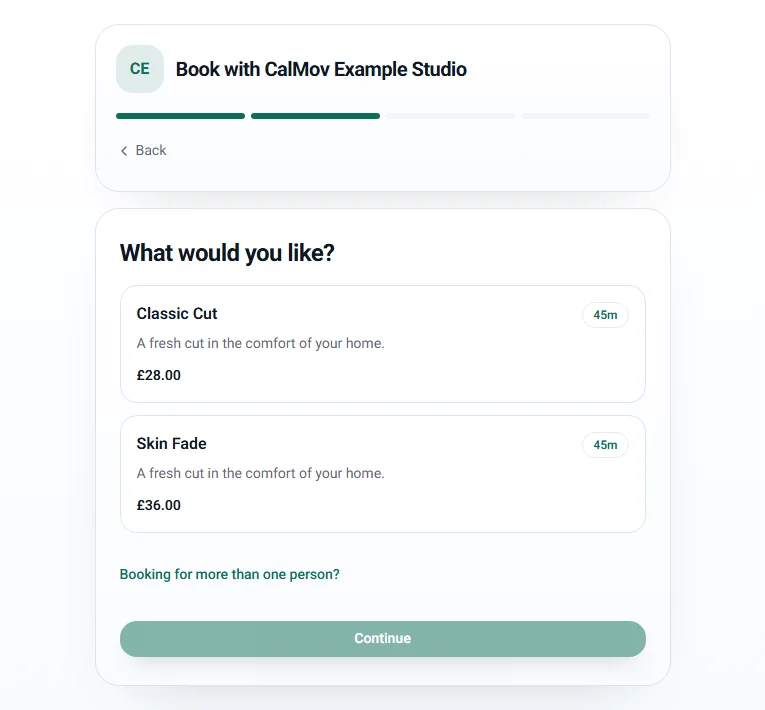
A customer chooses their haircut
Each service shows its price and length before the customer picks a time.
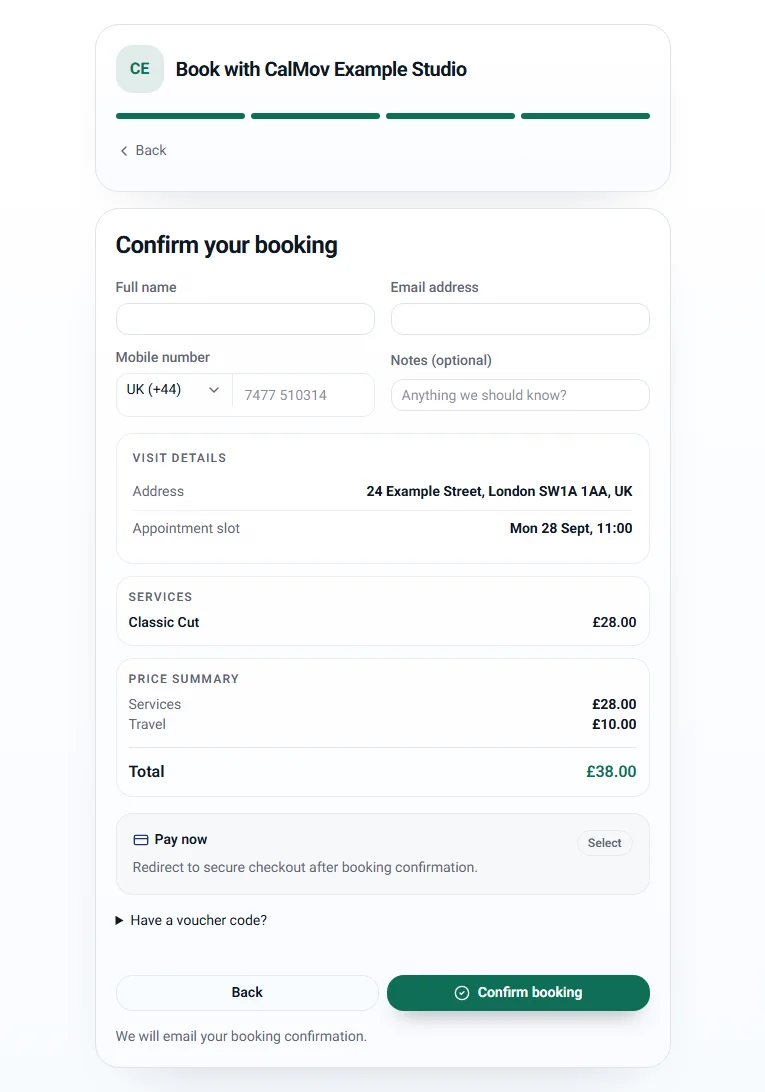
Show the total before confirmation
With travel pricing enabled on Pro, customers see the journey charge separately from the service price.
UK demo screenshots of the CalMov booking form. Services, prices, address and availability are examples. Your own settings determine what customers see.
Watch the booking walkthroughAn example day
A regular rebooks, and his cut is waiting
- 1. Monday: about a week before he's due, Jordan gets his rebooking email and taps the link. It opens your booking page on his usual skin fade, around his due date.
- 2. He enters his address first, so he's only offered times you can reach from the cuts either side.
- 3. He picks his saved profile instead of typing it again: No. 2 sides, scissor over on top, beard lined up.
- 4. Friday, 10:00am: you finish a cut across town. The calendar shows the drive to Jordan's between the two visits.
- 5. 10:45am: his usual cut is on the booking. You tap Start job and the timer runs against the estimate.
- 6. After the cut you take a photo of the finish (Pro), add a line to his cut notes and tap Finish job.
- 7. The calendar shows the drive back to base. In a couple of weeks, his next reminder goes out by itself.
How booking works
Set up a day of mobile haircuts
Build the booking page around the way you work, including the time spent setting up and packing away.
- 1.
Give each service enough time
Set separate durations and prices for a haircut, skin fade, beard trim or combined service. Include your usual consultation, cleaning and pack-down time in the duration.
- 2.
Choose your hours and service area
Add breaks and time off, then choose where you will travel. Keep a margin for parking and finding the customer.
- 3.
Let the address shape availability
Customers enter their address, then choose a service. Lite keeps your fixed gap between appointments; Pro checks roads and expected traffic on the drives around the booking.
- 4.
Review the visit before arriving
The booking keeps the service, time, address and client answers together. With travel pricing enabled, the customer sees the fee alongside the haircut price before confirmation.
See it in practice
A two-minute drive was blocking twenty minutes
Nova Fades used a fixed travel buffer in Calendly. In one example, it reserved twenty minutes for a journey that took about two. Narayan reports that weekly scheduling admin fell from around eight hours to no more than one after moving to CalMov. These are his estimates from running a mobile barber business in London.
Read the Nova Fades case study- The service operates from a fitted barber van and visits customers at different addresses.
- In that nearby-booking example, eighteen minutes were reserved beyond the drive itself.
- The case study explains the setup and the occasional manual adjustments still needed.
Plan your setup
Try it with a busy part of your week
Recreate two existing appointments, then try to book between them from your phone.
Try a nearby and a distant address
Check which times remain available for each address with your chosen travel plan.
Swap a haircut for a longer service
Use a combined cut and beard appointment to check that its full duration fits before the next customer.
Check the customer's total
If you charge for travel, check a nearby and an outer-area booking to see the right fee in the review step.
Before you choose
Is CalMov right for you?
CalMov suits a solo barber visiting customers at home or work. Give each service a duration, choose where you travel and let customers book around the journeys already in your diary.
A good fit when
- You are a solo barber travelling between homes, workplaces or care settings.
- Your haircut and beard services have clear durations and prices.
- You want online booking without creating unreachable back-to-back visits.
You may need another system if
- You need several barbers to accept bookings from one shared account today.
- You need chair, room, stock or walk-in queue management for a fixed-location shop.
Free planning tools
Free planning calculators for mobile barber scheduling
Use your own prices, travel time and costs to see what a working day could earn.
Mobile Barber Pricing Calculator
UK & US calculator · GBP or USD
Estimate the hourly effect of service time, setup, travel, mileage and direct appointment costs.
Use this free calculatorMobile Travel Fee and Service Area Calculator
UK & US calculator · GBP or USD
Test whether one customer journey meets your target and estimate a transparent travel fee when it does not.
Use this free calculatorFrequently asked questions
Can customers enter their address when booking?
Yes. Customers enter their address as part of online booking, and CalMov uses it to work out which times leave enough room for travel.
Does every CalMov plan calculate travel in the same way?
No. Lite uses a travel gap you set. Pro checks roads and expected traffic for the planned time, on the journeys before and after the appointment.
Can a barber set different appointment lengths?
Yes. Each service can have its own duration and price, so a booking is checked using the service the customer selected.
Can I automatically charge customers for travel?
Yes. Travel pricing is included on Pro. The customer sees the haircut price and any travel fee before confirming.
Is there a CalMov app for mobile barbers?
CalMov works in your phone's browser, so there is nothing to download from an app store. Add your CalMov dashboard to your home screen and open it like an app. Customers book from your booking page or website in their own browser, without downloading anything or creating an account.
Is CalMov suitable for a barbershop with chairs and walk-in customers?
CalMov is aimed at solo mobile barbers travelling to customer addresses. A fixed-location shop that needs chair allocation, walk-in queues, stock control or several simultaneous barber calendars should compare specialist barbershop software instead.
Are cut notes and rebooking reminders on the free plan?
Yes. Saved profiles, Visit records with a timer and notes, Site & access and Rebooking reminders are on every plan, including Lite. Photos, the job checklist and the report emailed to the client are Pro.
Can I change how often clients are reminded to rebook?
Yes. Each service has its own number of weeks, filled in as 3 for barbers. You can set a service to send no reminders, or switch automatic sending off and send the links yourself from Home. Every reminder email has a stop link for the client.
How does a returning client reuse their saved cut?
They pick their saved profile when they book. A client who has booked before can get a secure link by email to reuse their details, so there's nothing to type again.
Set-up guides
Related mobile business solutions
Practical scheduling guides
- Appointment scheduling with travel time: how CalMov checks each booking
- How mobile barbers can reduce gaps between bookings
- How to create a profitable mobile service area
- How much travel buffer to leave between appointments
- Travel time between appointments: worked examples
- Booksy alternative for mobile barbers: when CalMov fits
- How to start a mobile barber business in the UK