
UK & US guide
Square Appointments travel guide
How to add travel time in Square Appointments
A ninety-minute detail can take two hours of your day before you reach the next customer. Square Appointments gives you two ways to protect that time: extra time on a service, or a block on the calendar. This guide gives the steps from Square's own help pages, checked on 5 October 2026, and shows where a fixed block works and where it doesn't.
Quick answer
Yes, in two ways. On Square's Plus and Premium plans, switch on Block extra time after appointment for a service, and the same gap follows every booking. On any plan, create a personal event with Block time switched on to protect one particular drive. Both are fixed blocks that you set. Square's guides don't describe working out the drive from the customer's address.
The short answer: can Square Appointments add travel time?
Square Appointments has no setting called travel time. It has two tools that do the job. The first is extra time after a service. Square's service guide lists it for Square Appointments Plus and Premium, and the US guide also lists Square Plus and Premium. The second is a personal event that blocks time on your calendar. Square lists personal events for Free, Plus and Premium.
Square also knows that some businesses travel. In its appointment settings, one choice for where you accept appointments is in person at your client's location. The settings guide doesn't mention travel time, a service area or distance, and we couldn't find a Square help page that describes working out a drive between two addresses.
So the answer is yes, you can add travel time in Square, and you decide how many minutes. Use the guide for your own country and plan, because plan names differ a little between the UK and the US.
Step by step: block travel time in Square Appointments
Start with the service rule if your plan has it, then add personal events for the journeys that don't fit the rule.
One warning from Square's own wording. Processing time is a block of time during the service that customers can book online. That suits a product that needs to sit while you start another car at the same address. It does not suit a drive. For travel, use extra time or a personal event, which keep the time closed.
- Extra time, on Plus or Premium: in Square Dashboard, open Items & services, then Items, then the Service library. Choose the service.
- Switch on Block extra time after appointment, which adds extra time at the end of the service. Save. In the Point of Sale app the same switch is called Block Extra Time.
- A one-off drive, on any plan: go to Appointments, then Calendar. Click the time you want to protect and choose Create.
- Change the event type to Personal event. Give it a title, such as Drive to next job.
- Switch on Block time, so customers can't book over it. Without this, the event is only a note. Set the start and end, pick the staff member and save.
- Use the same personal event for the drive out before your first job and the drive home after your last one.
- Open your booking site on a phone and check that the first time offered after a job comes after the block.
What a fixed block can't know
Here is an example with made-up distances and drive times. A mobile detailer does a 90-minute maintenance detail and blocks 30 minutes of extra time after it. Three different customers book the next slot.
The block is about right for the middle journey and wrong for the other two. A day of short hops like the first row leaves 22 minutes unused after every job. One journey like the third row makes you 14 minutes late, with a customer watching the clock.
Personal events fix this for one day at a time. You look up the drive, then stretch or shrink the block by hand. It works, and it is one more job to do for every booking. If a job moves, the block has to move with it.
| Next customer | Distance | Drive time | With a 30-minute block |
|---|---|---|---|
| Same estate | 2.5 miles | 8 minutes | 22 minutes unused |
| Other side of town | 9 miles | 27 minutes | 3 minutes spare, before packing the van |
| A village on the edge of your area | 16 miles | 44 minutes | 14 minutes late |
When a fixed block is enough
A fixed block suits a lot of detailers, and Square's payment tools may be worth more to you than a cleverer diary. Stay as you are if most of these are true.
Two more settings in Square help here. You can choose to accept or decline each booking request yourself, which gives you a chance to check the address. And you can set how far in advance clients must book, from one hour to four weeks.
- You do two or three long jobs a day, so a spare 20 minutes rarely costs you a booking.
- Your customers are in one town or one cluster of estates.
- You group areas by day, such as north on Mondays, and keep to it.
- You already check each address when a booking comes in, and you don't mind adjusting a block.
- Square takes your payments, and you would not want to move them.
When to use address-aware booking instead
The fixed block stops being enough when your area is wide, when your days are full, or when you are building personal events for most bookings. Then the customer's address needs to shape the times they are offered.
CalMov works that way. The customer enters their address first, and CalMov only offers times you can reach, allowing for the journey before and after each job. On Pro, drive times come from the roads, with expected traffic, and you can add a travel charge by distance or drive time bands. You can set a service area by distance or drive time.
Be clear about the plans. On the free Lite plan, CalMov uses a fixed travel gap that you set, the same idea as Square's extra time. Road-based drive times are on Pro, at £22 a month at the founder price and £29 as standard ($29 and $39 in the US), with a 14-day free trial and no card.
CalMov is not a till. It doesn't replace Square's point of sale. A CalMov booking can be paid at the appointment, so you can keep taking cards with Square and use CalMov for the booking link. Lite and Pro are for one person, so a business with several vans is better served by Square's staff calendars today.
Moving a job: check the drive again
Rain, a customer running late, a job that overruns: detailing days get rearranged. Each move changes the drives on both sides of the job.
In Square, extra time moves with the service, but it is still the same fixed number. A personal event doesn't move by itself. After you move a job, look at the address before and the address after, and edit or delete the blocks you made by hand.
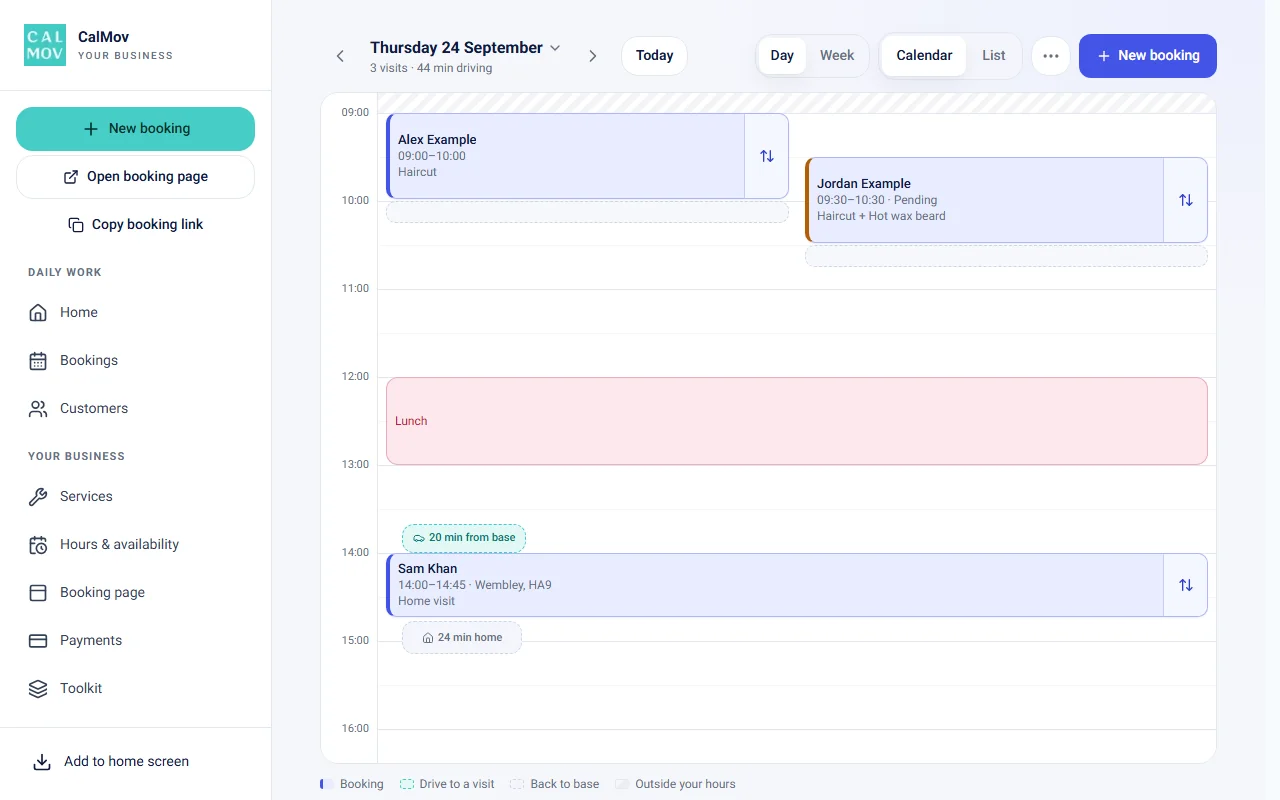
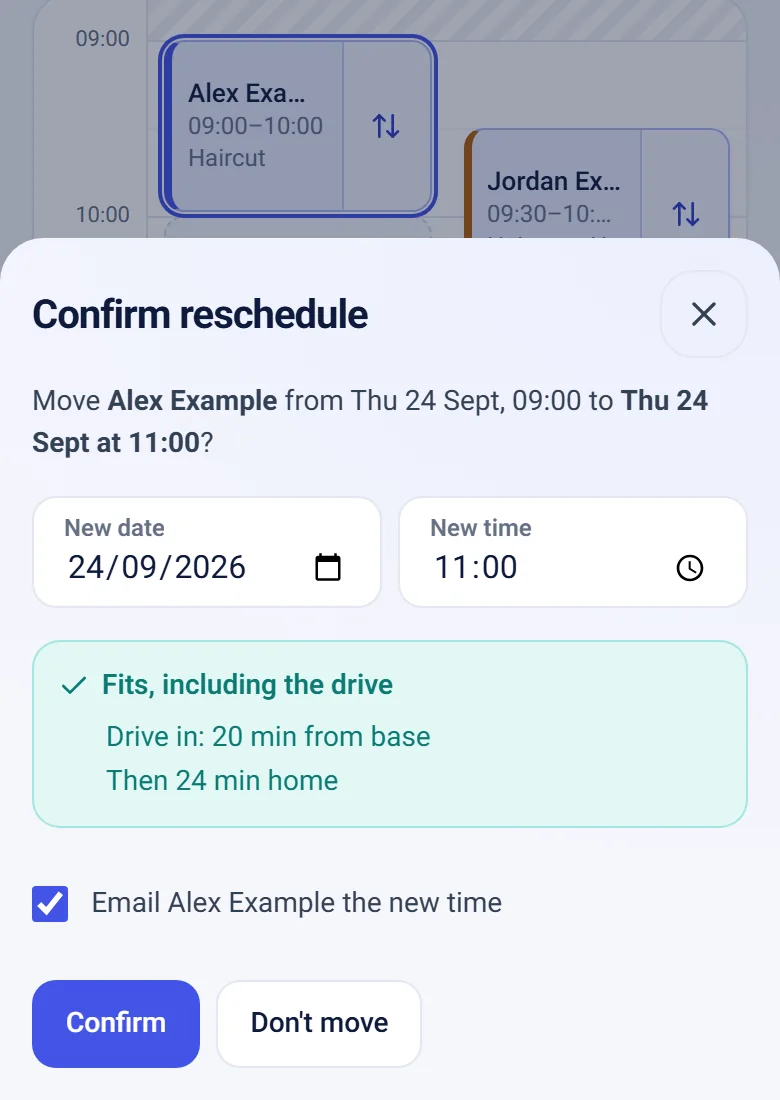
In CalMov, you drag the job to a new time on the calendar, and it checks that the new time fits, including the drive. The calendar shows the drive time between jobs and the drive back to base.
Checklist to set it up either way
The groundwork is the same in any tool: know your real journeys, close the time properly, and test as a customer.
- Record a week of real gaps: packing the van, driving, parking and setting up.
- In Square: choose in person at your client's location in the appointment settings.
- In Square: on Plus or Premium, switch on Block extra time after appointment for each package. On Free, plan to use personal events.
- In Square: add personal events, with Block time on, for the first drive out, the drive home and any long journey.
- In Square: keep processing time for work that really leaves you free at the same address.
- In CalMov: set your service area, minimum notice and booking window. On Lite, set your travel gap. On Pro, drive times are worked out for you.
- In either: book a test job from a near address and a far one, on a phone, with your longest package.
- In either: look again in a month. Count late arrivals and wasted gaps, then adjust.
Frequently asked questions
Which Square plans include extra time after an appointment?
Square's UK service guide lists it for Square Appointments Plus and Premium. The US guide lists Square Appointments Plus or Premium, and Square Plus or Premium. Personal events, which block time by hand, are listed for Free as well. Check the guide for your country.
Can I use processing time for the drive?
No. Square describes processing time as a block during the service that customers can book online. A drive needs time that nobody can book. Use Block extra time after appointment, or a personal event with Block time switched on.
Should I put the drive inside the advertised service duration?
It is better not to. The service length should tell the customer how long you will be at their car. Keep travel in a closed block around it. If you do fold travel into the duration, make sure you haven't also added extra time, or the same minutes are counted twice.
Does Square know the customer's address when they book?
Square's settings guide has an option to accept appointments in person at your client's location. The guide doesn't describe travel time or distance being worked out from an address. Book a test job on your own booking site to see what the customer is asked for.
What should I do when a customer changes their address?
Check the drives before and after that job again, then update any personal events you made. The service length hasn't changed, but the journey has.
How do I protect the drive to my first job and the drive home?
Extra time only follows a service, so it doesn't cover the trip out. Create personal events with Block time on at the start and end of the day. Square's guide says personal events can repeat, which helps if you leave at the same time each day.
Sources and further reading
Sources used to check this guide. Check the linked guidance for current requirements, features and prices.
- Square: service durations and extra time (UK) — Square
- Square: service durations and extra time (US) — Square
- Square: personal events that block booking availability (UK) — Square
- Square: personal events that block booking availability (US) — Square
- Square: appointment location, booking and notice settings (UK) — Square
- Square: appointment location, booking and notice settings (US) — Square
How CalMov helps
CalMov combines service duration, working availability and customer location to help mobile businesses offer bookable times that allow for the surrounding journeys.
Explore CalMov for mobile detailers