
UK & US guide
Square and CalMov for mobile detailing
Square Appointments alternative for mobile detailers
If you already take card payments with Square, replacing your diary may disturb a checkout that works. So separate the problems. Square is strong at payments and has a capable free booking system. What it documents for the drive between jobs is a fixed block of time. This guide covers both sides, with the real steps in Square and a worked day. We checked Square's own pages on 5 October 2026.
Quick answer
Square Appointments lets you take bookings at the client's location and block extra time after a service on its paid plans, or block time by hand with a personal event on any plan. Its settings guide doesn't mention travel time or a service area. CalMov asks for the customer's address first and only offers times you can reach. Keep Square if payments, invoices and staff calendars matter most. Look at CalMov if jobs across a wide area keep making you late.
What Square Appointments does well, and who should stay with it
Square joins booking and payment in one system. Its UK page lists a free booking website, automated email and text reminders, recurring appointments, unlimited staff calendars, waitlists, cancellation and no-show fees, and card payments in person or online. There is a Free plan for a single location.
For a detailer, the payment side is the draw. You can take a card on the driveway and see bookings and takings in one place. Recurring appointments suit a weekly or monthly maintenance wash.
Stay with Square if you already use it for payments, if you run more than one van and need staff calendars, or if text reminders and recurring bookings keep your regulars in line. CalMov is not a point of sale, does not send texts, and its Team plan is still to come.
Where Square falls short for mobile work
Square does allow for mobile work. Its settings guide lets you choose where you accept appointments, and one choice is in person at your client's location. You can also choose to accept or decline every request by hand, set how far ahead clients must book, from one hour to four weeks, and limit how far into the future they can book.
The same guide says nothing about travel time, a service area or distance. We couldn't find a Square help page that describes working out the drive between two customers' addresses. If your account or an add-on does this, ask Square to show you with two real addresses.
What Square documents is extra time. On its Plus and Premium plans you can block extra time after an appointment. It is a fixed number of minutes for each service, the same for a car round the corner and a car 45 minutes away.
How to handle travel time in Square Appointments today
If you are staying with Square, these are the steps its help pages describe. Menu names are from the guides we read, so check them in your own Dashboard.
Don't use processing time for a drive. Square's guide says processing time is a block during the service that customers can book online. A drive needs the opposite.
- In Square Dashboard, go to Appointments, then Settings, then Calendar & booking. Under the appointment preferences, choose in person at your client's location.
- On Plus or Premium, open Items & services, then the Service library. Pick a service, switch on Block extra time after appointment and save.
- On any plan, block a single drive by hand. In the Appointments calendar, create a personal event, give it a name such as Drive to next job, and switch on Block time.
- If your area is wide, set your booking preference so that you accept or decline each request. That gives you a moment to check the address.
- Set how far in advance clients must book, so nobody books a far-off job with an hour's notice.
- Each time a job is booked or moved, check both drives on a map and adjust your personal events.
A worked day: four details with a fixed 30-minute gap
This is an example with made-up customers and drive times. A mobile detailer has three 90-minute maintenance details and one three-hour full detail. Every service blocks 30 minutes of extra time afterwards. Packing the van is left out to keep the sums simple.
The first gap leaves 20 minutes spare. The drive after the full detail is 15 minutes longer than the gap, at the point in the day when you are least able to rush. The last gap happens to absorb it. A 45-minute block would cover the long drive and waste more than half an hour after every short one.
| Customer | Booked time | Drive from the last job | What happens |
|---|---|---|---|
| A, maintenance | 08:30 to 10:00 | From base | Starts on time |
| B, full detail | 10:30 to 13:30 | 10 minutes | Arrives 10:10 and waits 20 minutes |
| C, maintenance | 14:00 to 15:30 | 45 minutes | Arrives 14:15, 15 minutes late |
| D, maintenance | 16:00 to 17:30 | 12 minutes | Job C ends 15:45, arrives 15:57, on time |
The same day in CalMov
In CalMov the customer enters their address first. CalMov then only offers times you can reach, allowing for the journey before and after each job. You set a service area by distance or by drive time.
On Pro, the drive times come from the roads, with expected traffic. In the example, customer C is not offered 14:00, because the 45-minute drive from the full detail doesn't fit. The first start that fits is after 14:15. Customer B can be offered a start sooner than 10:30, because the drive from A is ten minutes. Over a day of long jobs, minutes like those add up.
On the free Lite plan, CalMov uses a fixed travel gap that you set, much like Square's extra time. Pro can also add a travel charge by distance or drive time bands.
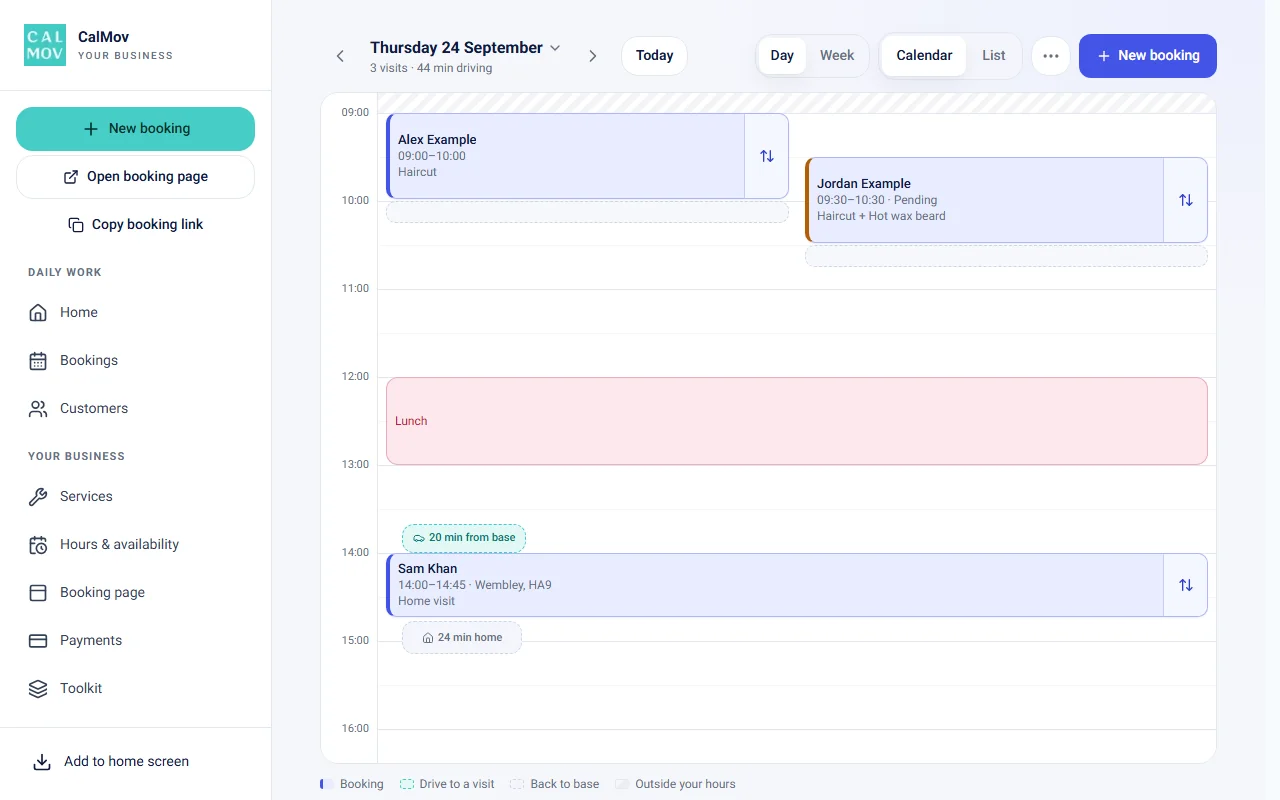
Your calendar shows the drive between jobs and the drive back to base. Drag a job to a new time and CalMov checks that it fits, including the drive.
What else a mobile detailer gets in CalMov
A detail on a small hatchback and a detail on a muddy seven-seater are not the same job. CalMov has a Toolkit of eight tools for this kind of difference. When you pick Car detailer as your trade, it suggests the usual setup and you change what you like.
One limit to know. Customers can't upload photos of the car before booking. If you price from photos, keep that step in your own messages.
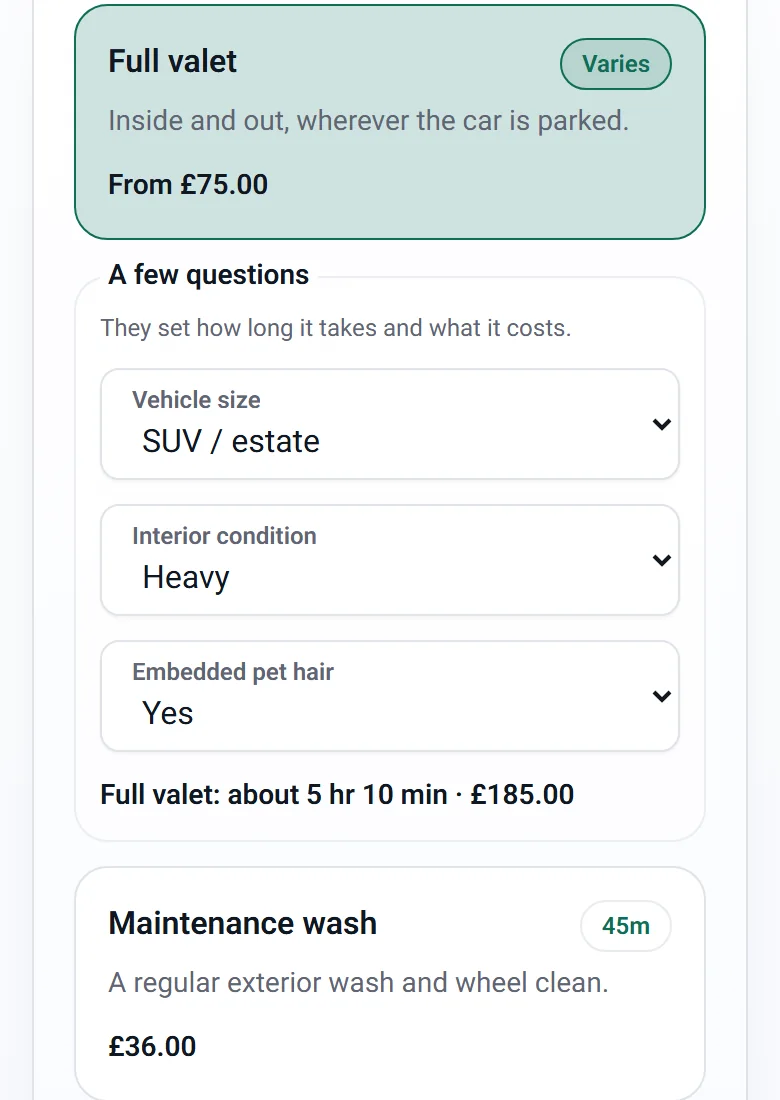
- Time and price questions: ask about vehicle size and condition. The two can be combined into a table, so each pair of answers sets the time and the price. The customer sees the result as they answer.
- Can't book online, or We'll review it (Pro): for the worst condition, tell the customer to get in touch, or hold the time while you confirm, adjust or decline.
- Saved profiles: a returning customer picks their saved vehicle instead of typing it again.
- Site & access: ready-made questions about parking, power, water and space to work, saved to the address.
- Visit records: tap Start job for a timer against the estimate and notes on what delayed you. Pro adds a job checklist.
- Photos (Pro): before and after photos, up to 12 a job, kept for two years, and a report you can email to the customer.
- Ready after the visit: a service can say how long until the car is ready, such as a coating that cures for 12 hours.
Cost and plans compared
Square's UK pricing page lists Free at £0 for a single location, Plus at £29 a month per location and Premium at £69 a month per location. Its US page lists $0, $49 and $149 a month per location. Card processing is charged per transaction on every plan. Square's service guide says blocking extra time after an appointment needs Plus or Premium. Personal events work on Free.
CalMov Lite is free, with up to two active services and a fixed travel gap. CalMov Pro is £22 a month at the founder price and £29 as standard ($29 and $39 in the US), with a 14-day free trial and no card. Pro adds road-based drive times, travel charges by distance or drive time, unlimited services, add-ons, online payments through Stripe (included on Pro; Lite can add them as an upgrade with a 30p fee per paid booking, in the UK) and the Pro tools. A Team plan, for more than one person, is in pilot.
The two can sit side by side. CalMov bookings can be paid at the appointment, so you can keep taking cards on your Square reader and use CalMov only for the diary.
| Question | Square Appointments | CalMov |
|---|---|---|
| Jobs at the customer's address | Yes, as an appointment location setting | Yes, the customer enters their address first |
| Gap between jobs | Fixed extra time on Plus and Premium, or manual blocks | Lite: a fixed gap you set. Pro: road-based drive times |
| Service area | Not mentioned in the settings guide | By distance or by drive time |
| Payments | Point of sale and card payments in one system | Pay at the appointment, or online through Stripe on Pro, or on Lite with the Online payments upgrade (UK) |
| Monthly price | Free, or £29 and £69 per location in the UK | Lite free. Pro £22, then £29 |
How to switch from Square Appointments, or run both
For most detailers who like Square's payments, running both is the low-risk route. Square stays as your till. CalMov becomes the booking link.
Whichever way you go, don't assume saved cards, invoices or appointment history move across. They stay in Square.
- List your future jobs, recurring customers and any prepaid amounts.
- Set up CalMov Lite for free with your two main packages, your hours and your service area.
- Add vehicle size and condition questions, so the time and price match the car.
- Book yourself in from a phone: a near address, a far one, and your longest package.
- Stop taking online bookings in Square once CalMov is taking them, so two diaries never sell the same slot. Keep Square open for payments.
- Rebook recurring customers by hand the first time. After that, rebooking reminders can prompt them.
Frequently asked questions
Does Square Appointments calculate travel time between jobs?
We couldn't find a Square help page that says it does. Square's guides describe blocking a fixed amount of extra time after a service on Plus and Premium, and blocking time by hand with a personal event. Its settings guide doesn't mention travel time or distance. CalMov Pro uses road-based drive times with expected traffic.
Can I keep my Square card reader and use CalMov for bookings?
Yes. A CalMov booking can be paid at the appointment, so you can take the card on your Square reader as you do now. CalMov can also take online payment through Stripe if customers would like to pay when they book: included on Pro, or an upgrade on Lite with a 30p fee per paid booking, in the UK. Paying online is always the customer's choice at the last step.
Can CalMov price by vehicle size and condition?
Yes. A time and price question can add minutes and money for each answer, and two questions can be combined into a table, such as size down the side and condition across the top. The customer sees the time and price before booking. Lite allows one such question per service, or two combined.
Does CalMov do recurring bookings like Square?
CalMov uses rebooking reminders instead of a repeating series. Each service has a number of weeks. About a week before a customer is due, CalMov emails a link to book the same service around the due date. If fixed recurring slots matter to you, Square does that.
Can CalMov handle several vans?
Only in a pilot. Lite and Pro are for one person, and the Team plan is in pilot: ask to join at enquiry@calmov.com. CalMov also doesn't plan a whole day's route for you. Square's staff calendars are the better fit for several vans today.
Is a travel charge enough to make a far-off job worth it?
It can cover fuel and time, but it can't create the time to reach the next customer. Check that the job fits first, then decide what to charge. CalMov Pro does both: it checks the drive and can add a charge by distance or drive time bands.
Sources and further reading
Official provider information reviewed for this comparison. Product features, prices and limits can change, so check every essential requirement on the provider's current pages.
- Square Appointments features: UK — Square
- Square Appointments features: US — Square
- Square: adjust your appointment settings (UK) — Square
- Square: adjust your appointment settings (US) — Square
- Square service durations and extra time: UK — Square
- Square service durations, variations and extra time — Square
- Square: create a personal event that blocks time — Square
- Square Appointments pricing: UK — Square
- Square Appointments pricing: US — Square
How CalMov helps
CalMov combines service duration, working availability and customer location to help mobile businesses offer bookable times that allow for the surrounding journeys.
Explore mobile detailing booking with CalMov