
UK & US guide
Booksy and CalMov for mobile barbers
Booksy alternative for mobile barbers: when CalMov fits
A 10:30 haircut can fit when the customer lives round the corner and fail when they live across town. Booksy is built for barbers and does a lot well, but its help pages describe mobile bookings that you confirm by hand. This guide sets out what Booksy offers, the real steps for handling travel in it, and where CalMov does something different. We checked Booksy's own pages on 5 October 2026 and have not tested a live Booksy account.
Quick answer
Booksy supports mobile services with a travel radius and travel fees, and its help guide says mobile bookings always need your manual confirmation. The gap between cuts is a fixed padding time you set. CalMov asks for the customer's address first and only offers times you can reach. Stay with Booksy if its marketplace and shop tools bring you work. Look at CalMov if checking every address by hand is the daily problem.
What Booksy does well, and who should stay with it
Booksy is made for barbers, salons and beauty businesses. Its feature pages list a marketplace where new clients can find you, client reviews, a portfolio, appointment confirmations and reminders, deposits and cancellation fees, card payments, staff profiles and shifts. Your marketplace listing is included in the subscription.
For mobile work, Booksy's feature page says you can offer travel services and decide your travel radius and your price, including travel fees. So Booksy does handle appointments at the customer's address. That is more than many booking tools offer.
Stay with Booksy if a good share of your new clients find you through its marketplace, if you also cut in a shop with other barbers, or if you rely on its deposits, card payments and automatic appointment reminders. Those are real strengths, and CalMov does not replace them. CalMov has no client marketplace and does not send text messages.
Where Booksy falls short for mobile work
Booksy's service settings guide says that a service marked as a Mobile Service will always require manual appointment confirmation from you. Ordinary Booksy bookings are confirmed automatically unless you switch that off, so this is a rule for mobile services in particular. In practice, each home visit request waits until you have looked at it.
The time between appointments is handled by Padding Time. Booksy describes it as extra time before or after an appointment for prep, admin work or cleaning, blocked off in your calendar. It is a fixed number of minutes for each service. It is the same whether the next customer is two streets away or half an hour's drive.
We couldn't find a Booksy help page that describes working out the drive between two customers' addresses and changing the times on offer to match. The travel radius decides who can ask for a visit. It doesn't tell you whether 11:05 works after the cut before it. That check is left to you at the confirmation step.
How to handle travel time in Booksy today
If you are staying with Booksy, these are the steps its help pages describe. Menu names are from the guides we read on 5 October 2026, so check them against your own app.
Padding protects a fixed gap. Confirmation is where you protect the real journey. The more home visits you take in a week, the more of these checks you do.
- Open Business Settings, then Business Details, then Location & Mobile Services. Booksy's guide says to adjust your Mobile Services settings there before you mark any service as mobile. Its feature page says you decide your travel radius and travel fees.
- Go to Services Setup, then Services & Combo Services. Pick a service, open its Settings tab and mark it as a Mobile Service.
- In the same Settings tab, set Padding Time before the appointment, after it, or both. Choose a number that covers packing up, your usual drive and parking.
- For a one-off long drive, block the time on your calendar as unavailable instead of making a new appointment.
- When a mobile request arrives, look at the address, then at the cuts either side of it. Check both drives on a map before you confirm.
- If the drive doesn't fit, contact the client and agree another time.
A worked day: four cuts with a fixed 20-minute gap
This is an example with made-up customers and drive times. A mobile barber has four 45-minute cuts at customers' homes and a 20-minute padding time after each one. To keep the sums simple, packing up is left out.
Two things go wrong, in opposite directions. Before the second cut, 14 minutes are spent waiting outside. Before the third, the drive is 12 minutes longer than the gap, and the last customer of the day feels it too. A bigger padding time would fix the long drive and make the short one worse. In Booksy you would catch the long drive only if you checked the map before confirming.
| Customer | Booked time | Drive from the last cut | What happens |
|---|---|---|---|
| A | 10:00 to 10:45 | From base | Starts on time |
| B | 11:05 to 11:50 | 6 minutes | Arrives 10:51 and waits 14 minutes |
| C | 12:10 to 12:55 | 32 minutes | Arrives 12:22, 12 minutes late |
| D | 13:15 to 14:00 | 9 minutes | Cut C ends 13:07, arrives 13:16, a minute late |
The same day in CalMov
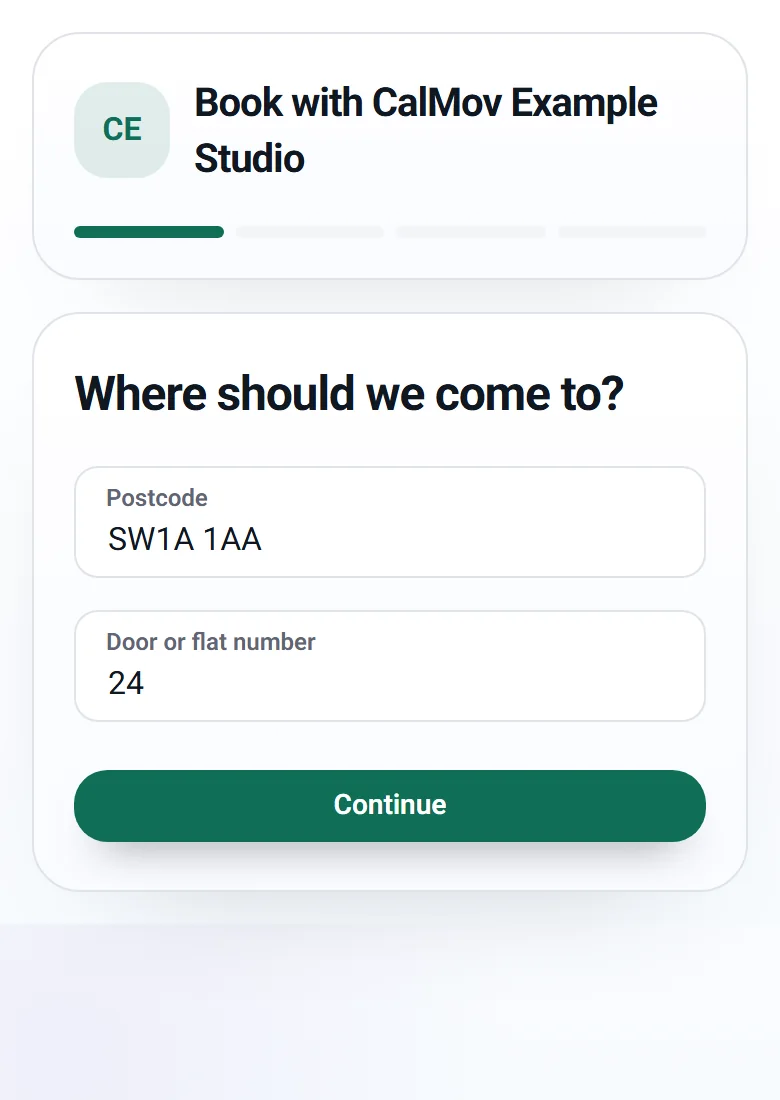
In CalMov the customer enters their address first, before they see any times. CalMov then only offers times you can reach, allowing for the journey before and after each visit.
On Pro, drive times come from the roads, with expected traffic. Take the same example day. When customer C looks for a time, 12:10 is not offered, because the 32-minute drive from customer B doesn't fit. The first start that fits is after 12:22. When customer B books, a start sooner than 11:05 can be offered, because the drive from A is only six minutes. Nobody waits for you to confirm, and you don't open a map.
On the free Lite plan, CalMov uses a fixed travel gap that you set. That is close to Booksy's padding: simple, and right only when your drives are much the same length. Be honest with yourself about which one you need.
Your calendar shows the drive time between visits and the drive back to base. If you drag a booking to a new time, CalMov checks that the new time fits, including the drive.
What else a mobile barber gets in CalMov
CalMov has a Toolkit of eight tools. You switch each one on or off, and switching one off hides it without deleting anything. When you pick Barber as your trade, CalMov suggests the usual setup for barbers and you change what you like. Nothing is switched on by itself.
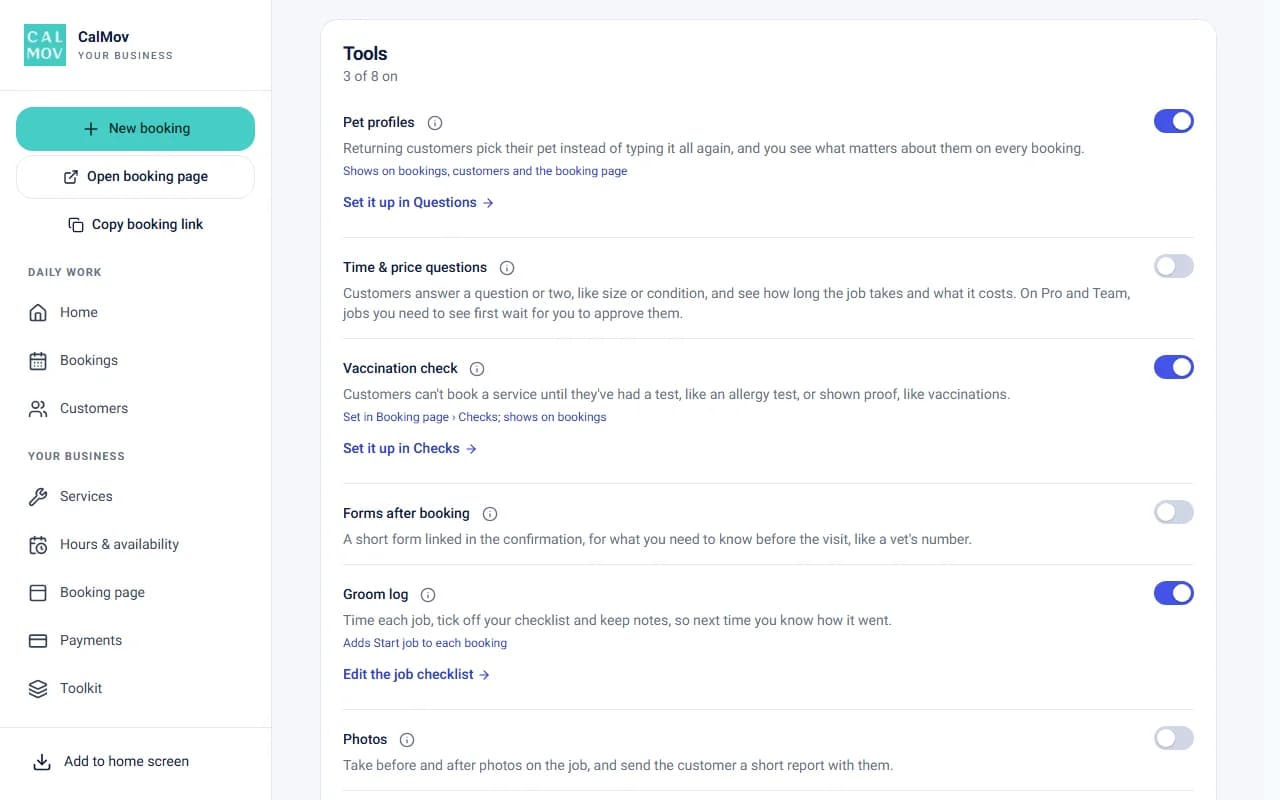
- Cut notes: tap Start job on the day for a timer against the estimate and a place for notes. Afterwards the record shows how long the cut took. On Pro you can add a checklist.
- Rebooking reminders: each service has a number of weeks, set to three for barbers. About a week before a customer is due, CalMov emails them a link to book the same cut. Every email has a stop link.
- Saved profiles: a parent can save a profile for each child and pick one next time instead of typing the details again.
- Time and price questions: a yes or no question can add minutes and money to a cut, such as a beard trim. Lite allows one such question per service, or two combined into a table.
- Site & access: ready-made questions about parking or a door code, answered after booking and saved to the address.
- Photos (Pro): before and after photos in job mode, up to 12 a job, and a report you can email to the customer.
Cost and plans compared
Booksy's UK pricing page lists one plan at £40 a month plus VAT, with extra users at £5 a month each and a 7-day free trial. Its US page lists $29.99 a month plus tax, extra users at $20 a month each, and a 14-day trial. Card processing fees are separate. Marketplace bookings are listed as free, and the optional Boost feature takes a one-time fee from a new Boost client's first visit.
CalMov Lite is free. It includes up to two active services (or unlimited for a small monthly upgrade), a fixed travel gap, the booking page, the calendar, calendar sync, confirmations and every tool not marked Pro. CalMov Pro is £22 a month at the founder price and £29 as standard ($29 and $39 in the US). Pro adds road-based drive times with expected traffic, travel charges by distance or drive time, unlimited services, add-ons, online payments through Stripe (included on Pro; Lite can add them as an upgrade with a 30p fee per paid booking, in the UK) and the Pro tools. There is a 14-day free trial with no card. A Team plan, for more than one person, is in pilot.
Price alone won't settle it. Booksy's subscription includes a marketplace listing, and CalMov's doesn't. Count the clients the marketplace sends you and the time you spend checking addresses, then compare.
| Question | Booksy | CalMov |
|---|---|---|
| Visits at the customer's address | Yes, as a Mobile Service with a travel radius | Yes, the customer enters their address first |
| Gap between visits | Fixed padding time per service | Lite: a fixed gap you set. Pro: road-based drive times |
| Who checks the journey | You, when you confirm each mobile booking | CalMov, before times are shown |
| Finding new clients | Marketplace listing included | No marketplace |
| Monthly price for one person | £40 plus VAT in the UK, $29.99 plus tax in the US | Lite free. Pro £22, then £29 |
How to switch from Booksy, or run both
You don't have to choose in one go. Some barbers keep Booksy for shop days and marketplace clients and give regular home-visit customers a CalMov link. If you do that, make sure a time booked in one diary is blocked in the other. CalMov adds bookings to Google Calendar, Outlook or iCloud and treats busy times there as unavailable.
Nova Fades is a mobile barber in London that uses CalMov. It moved from Calendly, not Booksy, so read its story for the travel problem, not as a Booksy test.
- Write down your future bookings, service lengths, prices and any deposits already taken.
- Ask Booksy's support team for a copy of your client list. Booksy's help page says that is how you get it.
- Set up CalMov Lite for free: your cuts, your hours, your service area and a travel gap.
- Book yourself in from a phone with a near address and a far one. Check the times offered.
- Send the new link to a few regulars first. Keep one booking link per service so two diaries never sell the same slot.
- Don't expect reviews, saved cards or appointment history to move across. Plan around them.
Frequently asked questions
Does Booksy calculate travel time between mobile appointments?
We couldn't find a Booksy help page that says it does. Booksy's service settings guide describes a Mobile Service setting, a fixed Padding Time and manual confirmation of every mobile booking. That leaves the journey check with you. CalMov Pro uses road-based drive times with expected traffic before it offers a time.
Can I charge a travel fee and set a travel radius in Booksy?
Yes. Booksy's feature page says you decide your travel radius and your price, including travel fees. CalMov also lets you set a service area by distance or drive time, and Pro adds travel charges by distance or drive time bands.
Is CalMov cheaper than Booksy?
For one barber, the list prices are lower: CalMov Lite is free and Pro is £22 a month at the founder price, against Booksy's £40 plus VAT in the UK. But Booksy includes a marketplace and CalMov doesn't. Compare what each one brings you, not only the subscription.
Will I lose marketplace clients if I leave Booksy?
You would lose the listing, because CalMov has no marketplace. Customers reach your CalMov booking page from your own link or your website. If Booksy sends you new clients every month, keeping it for discovery and using CalMov for home visits may suit you better than a full switch.
Can CalMov run a team of mobile barbers?
Only in a pilot. Lite and Pro are for one person, and the Team plan is in pilot: ask to join at enquiry@calmov.com. If several barbers need their own diaries today, Booksy's staff tools are the better fit.
Does CalMov remind customers like Booksy does?
Booksy's feature page says automatic appointment reminders are included. CalMov emails a confirmation when a customer books, and a rebooking reminder when they are due for their next cut. It does not send text messages. If your clients rely on Booksy's reminders, count that in Booksy's favour.
Sources and further reading
Official provider information reviewed for this comparison. Product features, prices and limits can change, so check every essential requirement on the provider's current pages.
- Booksy service settings and mobile appointment confirmation: UK — Booksy
- Booksy service settings and mobile appointment confirmation: US — Booksy
- Booksy: how to mark free time between appointments — Booksy
- Booksy: whether you have to confirm bookings made by clients — Booksy
- Booksy: how to obtain a copy of your client list — Booksy
- Booksy features: UK — Booksy
- Booksy features: US — Booksy
- Booksy pricing: UK — Booksy
- Booksy pricing: US — Booksy
- Nova Fades customer case study — CalMov
How CalMov helps
CalMov combines service duration, working availability and customer location to help mobile businesses offer bookable times that allow for the surrounding journeys.
Explore mobile barber booking with CalMov