
UK guide
Weekly planning guide
How to plan a workable week for a mobile service business
Five one-hour visits look easy in an eight-hour day. Add 20 minutes of setup and pack-down to each, a 10-minute drive out, between each pair of visits and home again, 5 minutes to park at each address and a 30-minute break: the day needs 515 minutes, 35 more than it has. This guide shows a solo mobile business how to plan a week that adds up, with a free worksheet and an illustrative five-day example.
Quick answer
Plan in this order: fixed commitments and the hours you'll really work; service times with setup and pack-down; an area for each day; every drive, plus parking and access; breaks and admin. What's left is spare time for overruns, and every day needs some. At the end of the week, compare the plan with what happened and change one thing. The free worksheet has a row for each day.
Who this weekly plan fits, and who it doesn't
This guide is for one person who travels to customers, such as a mobile barber, dog groomer, car detailer, cleaner or therapist. It suits visits that are booked ahead, in an area you could sketch on a map.
It's a poor fit for a team or several vans, which need crew scheduling and route planning, or for work that's mostly same-day call-outs. It isn't tax, legal or employment advice: where it mentions rules, it links to GOV.UK.
What fills a mobile working day
A diary that only shows appointments hides much of the day. Plan with these seven kinds of time and keep them apart, because each goes wrong for a different reason. A visit that keeps overrunning needs a longer service time, not a longer drive.
- Service: the work the customer pays for.
- Setup and pack-down: carrying kit in, clearing up and packing away.
- Mapped drive: the journey a route planner shows for when you'll drive.
- Parking and access: finding a space, the walk in, stairs and gate codes. Maps leave it out, and it depends more on the area than the distance.
- Breaks: time to eat and rest, out of the car.
- Admin: messages, invoices, records, restocking and cleaning kit.
- Spare: unplanned minutes that absorb an overrun or a slow journey.
The weekly planning worksheet
The worksheet is a CSV file that opens in Excel, Google Sheets, Numbers or LibreOffice. It has a filled-in example, a row for each day and a week total.
For each day, enter the area, start and finish, fixed commitments and planned visits, then split the working minutes into the seven kinds of time. Spare time is what's left. If it comes out below zero, the day doesn't fit. Fill in Actual finish and Notes on the day, for the weekly review.
Step 1: fixed commitments and the hours you'll really work
Put in what can't move before any customer: school runs, childcare, a regular care-home morning, a second job, the van's service.
Then set the hours you'll really work, from leaving home to getting back. Customer time sits inside them. If you leave at 08:30 for a first customer 20 minutes away, with 5 minutes to park and 10 to set up, their visit can't start before 09:05. To be home by 17:00 from a last customer 15 minutes away, that visit must be packed away by 16:45.
Plan long days sparingly. The Highway Code says not to begin a journey if you're tired, and a mobile day is full of journeys.
Step 2: service times that include setup and pack-down
Use your own recent visits, not your best day. Time an ordinary visit and split it into setup, service and pack-down. A 60-minute service with 10 minutes either side takes 80 minutes of your day before you drive anywhere.
Give services that really differ their own times: a first visit, a large dog or a very dirty car can take far longer than usual. Count setup and pack-down once, either in the service's time or in the gap between visits, never both.
Step 3: area days and every journey between them
Area days stop one booking across town from breaking a day. Split your service area into a few clusters of postcodes and give each its own days, based on where your bookings and enquiries really come from. The area nearest home might get two or three days a week; an outer area might get one, once enough customers there want it.
Then count every journey: the first drive out, each drive between visits and the drive home, at the time of day you'll travel, with parking and access added for each area. If a day must cover two areas, make the cross-area drive once, next to your break, and count all of it.
Step 4: breaks and admin time
Plan a real break on every full day, out of the car. GOV.UK's rest-break rules for workers over 18 make a useful minimum: an uninterrupted 20-minute break in a day of more than 6 hours, 11 hours' rest between working days, and 24 hours off each week or 48 each fortnight. GOV.UK says self-employed people don't have a worker's rights, so these don't bind you.
The Highway Code recommends a break of at least 15 minutes after every two hours of driving. Short hops between customers rarely add up to that; a long trip to a far area can.
Admin is work too, and replying to messages isn't something to do at the wheel: GOV.UK says it's illegal to hold and use a phone while driving, even when you're stopped at traffic lights or queuing in traffic. A short parked slot each day and a weekly block are easier to keep.
Use the weekly block for records. GOV.UK says sole traders must keep records of business income and expenses, and of business miles if they use simplified expenses for a vehicle. If Making Tax Digital for Income Tax applies to you, add its quarterly updates.
Step 5: spare time for overruns
A day with no spare time has nowhere to put a delay. Keep at least one spare block every working day, where trouble is most likely: after the least predictable visit, before a commitment you can't miss, or on the day with the most driving.
How much is a judgement, not a rule; the example below uses 30 to 40 minutes a day. If it goes unused for weeks, take some back. If it's gone by lunchtime most days, fix service times or areas first. Spare time you don't need becomes admin or an earlier finish.
A worked five-day example (illustrative)
This example is made up to show the method. It isn't customer data or a target. One person works from home with a 60-minute and a 90-minute service. Every visit needs 20 minutes of setup and pack-down, and 5 minutes of parking and access, or 10 in the town centre.
Drives between customers in one area take 10 minutes. The drive out and the drive home each take 10 minutes for the north, 15 for the south and east, 20 for the town centre and 35 for the west. Every row adds up to its working time.
- Monday and Tuesday both have 270 minutes of service. In town, where each arrival takes longer, that's three visits instead of four: Monday's four would need 505 minutes on Tuesday, 10 more than the day has.
- Wednesday stops at 14:30 for the school run, with its spare time before that stop.
- Thursday's 70 minutes of driving to the west and back are shared by four visits; with the most driving, it gets the most spare time.
- Friday carries the week's admin: two hours for invoices, records and next week's plan.
- Across the week, service takes 19 of the 38.5 working hours. Setup, pack-down, driving, parking and access take almost 12.
| Day | Area and hours | Visits | Service + setup and pack-down (min) | Drive + parking and access (min) | Break + admin (min) | Spare (min) |
|---|---|---|---|---|---|---|
| Monday | North, near home: 08:30 to 16:45 | 4: three of 60 min, one of 90 | 270 + 80 | 50 + 20 | 30 + 15 | 30 |
| Tuesday | Town centre: 08:30 to 16:45 | 3: all 90 min | 270 + 60 | 60 + 30 | 30 + 15 | 30 |
| Wednesday | South: 08:30 to 14:30, school run at 15:00 | 3: all 60 min | 180 + 60 | 50 + 15 | 20 + 0 | 35 |
| Thursday | West, the outer area: 08:15 to 17:15 | 4: three of 60 min, one of 90 | 270 + 80 | 100 + 20 | 30 + 0 | 40 |
| Friday | East, then admin at home: 08:30 to 15:30 | 2: one of 90 min, one of 60 | 150 + 40 | 40 + 10 | 30 + 120 | 30 |
| Week total | Five days: 38 hours 30 minutes | 16 visits | 1,140 + 320 | 300 + 95 | 140 + 150 | 165 |
Step 6: review the week and change one thing
At the end of the week, put the plan next to what happened. Fill in Actual finish, note what ran over, and look for the cause that repeats rather than the one bad day.
Change one thing for next week and keep the rest, so you can tell whether it worked: a longer service time, fewer visits in a slow area, or less spare time if it's never used. Review the whole plan when school terms, areas or services change.
- Did each day finish when the plan said?
- Which visits ran over, and by how much?
- Was the spare time used, and on what?
- Did any booking land in the wrong area for its day?
Putting your weekly plan into CalMov
Most of the plan goes into Hours & availability. In the Hours tab, each day has a switch (off shows Closed) and one or more time ranges. A break is the gap between two ranges, such as 09:00 to 12:00 and 13:00 to 17:00. A weekly commitment like Wednesday's school run can be a shorter range that day; a one-off goes in Time off & changes, which blocks a day, several days or a few hours. Busy times in a connected Google Calendar, Outlook or iCloud Calendar block availability too.
Give each service in Services the time your own visits take, with setup and pack-down counted once. In the Travel tab, set your service area by distance, with Maximum distance (miles), or by drive time, with Maximum travel time (min). Customers enter their address first, and CalMov only offers times you can reach, allowing for the journey before and after each visit: a fixed travel gap you set on Lite, or road-based drive times with expected traffic on Pro. A drive time is only the drive, so count parking and access somewhere.
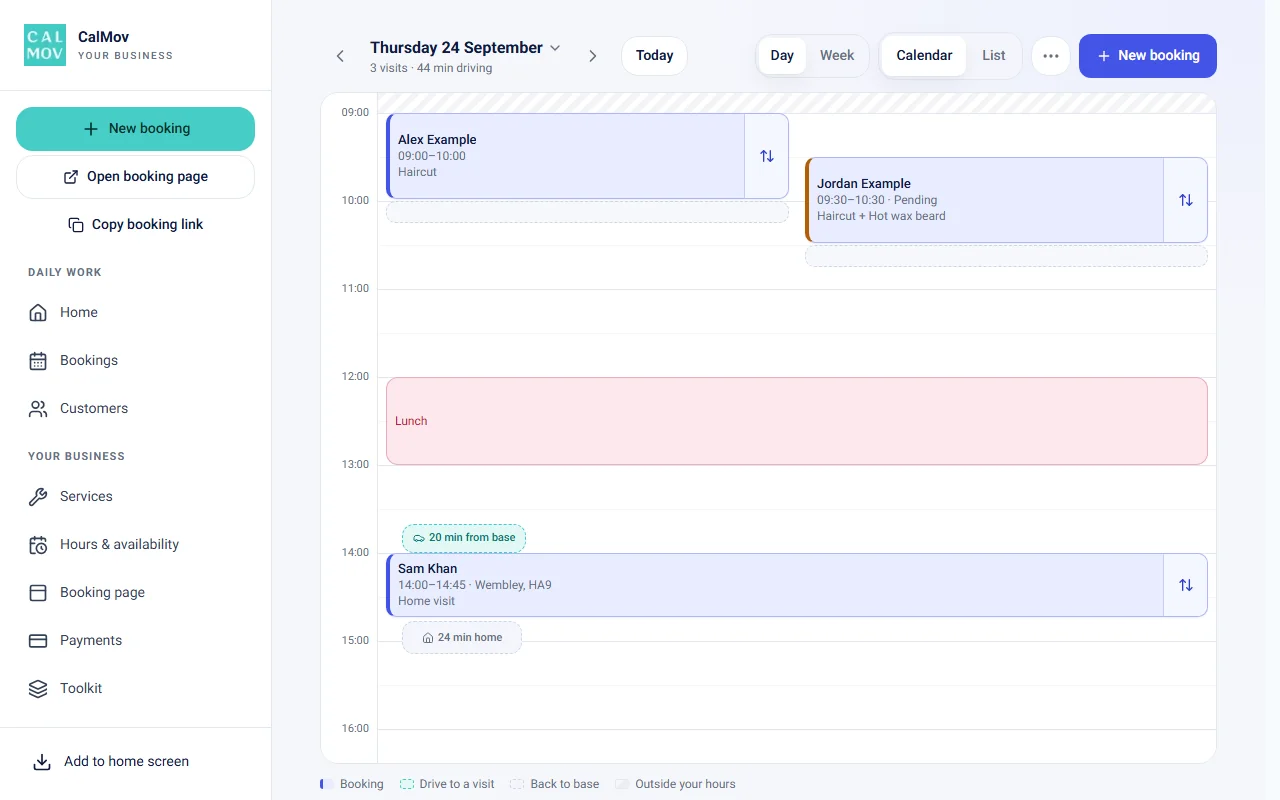
CalMov has one service area for every day. It doesn't plan your route or set areas by day, so area days are your plan to keep. The calendar shows the drive time between visits and Back to base, and dragging a booking to a new time checks that it fits, including the drive. With Visit records switched on in Toolkit, Start job runs a timer against the estimate, and the record shows how long each job took.
Frequently asked questions
How many appointments should a mobile business plan in a day?
There's no right number. Add up your own service times, setup and pack-down, drives and parking, then check what's left for a break, admin and spare time. In this guide's example, 270 minutes of service fitted as four visits near home but only three in town.
Do I have to take breaks if I'm self-employed?
GOV.UK's rest-break rules are for workers, and GOV.UK says self-employed people don't have a worker's rights. The Highway Code still says not to begin a journey if you're tired, so plan at least the 20 minutes a worker would get on a day of over six hours.
What is an area day?
A day when you only take visits in one part of your service area, such as the north on Mondays. It keeps the drives between visits short. Tell customers which day covers their area.
How much spare time should I leave in a working day?
Start with one block a day, after the least predictable visit or before something you can't miss. The example here uses 30 to 40 minutes, as an illustration rather than a target. Adjust it from your weekly review.
Does CalMov plan my week for me?
No. You plan the week; CalMov keeps bookings inside it, offering customers in your service area only times inside your hours that you can reach. It doesn't reorder your day or set areas by day.
Sources and further reading
Sources used to check this guide. Check the linked guidance for current requirements, features and prices.
- Rest breaks at work — GOV.UK
- Employment status: self-employed and contractor — GOV.UK
- The Highway Code: rules for drivers and motorcyclists (89 to 102) — Department for Transport
- Using a phone, sat nav or other device when driving — GOV.UK
- Business records if you're self-employed — GOV.UK
- Simplified expenses if you're self-employed — GOV.UK
- Use Making Tax Digital for Income Tax — HM Revenue and Customs
How CalMov helps
CalMov combines service duration, working availability and customer location to help mobile businesses offer bookable times that allow for the surrounding journeys.
See how CalMov turns your hours and travel settings into bookable times